
🔥 Risk Management in Cybersecurity: Assessing Probability vs. Impact


Risk management plays a vital role in cybersecurity and information assurance. The level of security an organization needs depends on the risk it is willing to accept. By assessing potential threats and vulnerabilities, businesses can implement the necessary security controls to minimize risks effectively.

🚨 Types of Risks Organizations Face

🔹 Cyber Threats: Malware, phishing, denial-of-service (DoS) attacks, and social engineering.
🔹 Environmental Risks: Fire, storms, and natural disasters.
🔹 Physical Security Risks: Theft, violent crime, or sabotage.
🔹 Operational Risks: System failures, human errors, or supply chain disruptions.

🛡️ The Risk Management Process

1️⃣ Identify Risks — Determine possible threats and vulnerabilities.
2️⃣ Assess Risk Impact & Probability — Evaluate how likely an event is and how much damage it could cause.
3️⃣ Implement Security Controls — Reduce risks to an acceptable level using mitigation strategies.
4️⃣ Monitor & Improve — Regularly update security measures to adapt to new threats.

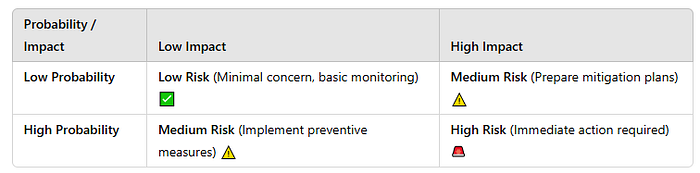
📊 Probability vs. Impact Matrix

A key part of risk assessment is classifying risks based on their likelihood (probability) and impact (severity):
⚡ Why Risk Management Matters

A well-designed risk management strategy helps organizations identify vulnerabilities, calculate threat likelihood, and reduce risk exposure. By continuously monitoring and improving security measures, businesses can ensure resilience against cyber threats and operational disruptions.

#CyberSecurity #RiskManagement #ThreatProtection #RiskAssessment #InfoSec #CyberThreats #SecurityAwareness 🚀

Comments

Popular posts from this blog

Mastering NGINX: The High-Performance Web Server Revolution

🚀 Mastering NGINX: The High-Performance Web Server Revolution 🌐 NGINX (pronounced "Engine-X") is more than just a web server. It's a high-performance, versatile, and scalable solution for modern web application delivery, making it an essential tool for developers, system administrators, and businesses. Let’s dive into its core functionalities, real-world use cases, and an example to showcase its power! 🌟 What is NGINX? NGINX is an open-source software that started as a web server but has evolved into a multi-functional application delivery platform. It is known for its speed, efficiency, and reliability. Key Features : Reverse Proxy : Routes client requests to backend servers efficiently. Load Balancer : Distributes traffic across multiple servers to ensure high availability and performance. Content Caching : Caches frequently accessed content to reduce server load. Web Application Firewall (WAF) : Protects applications from common threats like SQL injection and XSS...

NGINX in Real-World Scenarios - Increasing Performance

  🌐 NGINX in Real-World Scenarios Content Delivery Networks (CDNs) : NGINX powers popular CDNs like Cloudflare due to its high-speed content caching capabilities. E-Commerce Platforms : Handles millions of requests for platforms like Shopify, ensuring zero downtime. Streaming Services : Used by Netflix to deliver seamless video streaming experiences. 🛡️ Enhancing Security with NGINX Enable SSL/TLS: NGINX supports Let's Encrypt for free SSL certificates. sudo apt install certbot python3-certbot-nginx sudo certbot --nginx -d example.com -d www.example.com 🛡️ Enhancing Security with NGINX Enable SSL/TLS: NGINX supports Let's Encrypt for free SSL certificates.   Web Application Firewall (WAF): Integrate ModSecurity for advanced threat protection.   📈 Performance Optimization Tips Use gzip compression to reduce response size. gzip on; gzip_types text/plain application/json;     2. Enable HTTP/2 for faster load times.   listen 443 ssl http2;   3...

Real-World Example: NGINX Reverse Proxy Configuration

  📋 Real-World Example: NGINX Reverse Proxy Configuration Let’s set up NGINX to act as a reverse proxy for two backend servers running on ports 8080 and 8081. Step 1: Install NGINX sudo apt update sudo apt install nginx Step 2: Configure NGINX Edit the default NGINX configuration file:   sudo nano /etc/nginx/sites-available/default   Add the following configuration:   server { listen 80; server_name example.com; location / { proxy_pass http://backend_servers; proxy_set_header Host $host; proxy_set_header X-Real-IP $remote_addr; proxy_set_header X-Forwarded-For $proxy_add_x_forwarded_for; } } upstream backend_servers { server 127.0.0.1:8080; server 127.0.0.1:8081; } Step 3: Test and Reload NGINX   Test the configuration: sudo nginx -t   Reload NGINX:   sudo systemctl reload nginx     Result : Clients accessing http://example.com are automatically routed to one of the backend servers, en...